Thursday, March 3, 2011

Annoying interruption problem solved for Oracle R12 E-Business Suite

I run most of my test environments using virtual servers with VMWare and Oracle Sun Virtualbox. As such the network connections use DHCP to access wireless internet access points. Recently a new issue came up that gave me hours of grief. After making some changes to my Oracle R12 context file, I was unable to get the middle tier application services started successfully. I received the following errors:

******************************************************
ERROR: Timed out (100000): Interrupted Exception
Your are running adoafmctl.sh version 120.6.12000000.2
Starting OPMN managed OAFM OC4J instance
*****************************************************


A quick search on My Oracle Support found similar issue in Note: 564536.1.
The note recommends changing the timeout parameters for oacore parameter
under the $ORA_CONFIG_HOME/10.1.3/opmn.xml file for the middle application tier server as well as changing the context file parameters s_oacoretimeout, s_formstimeout, and s_oafmtimeout for the middle tier application context file and running autoconfig on the middle tier. I tried this and unfortunately, it did not fix my problem.

So, upon further investigation, I found the solution given by My Oracle Support Note: 412980.1 Problem: oafm, forms, and oacore not starting after IP Address Change.

Aha! I thought since I use DHCP and virtual networks, this plays havoc on my Oracle R12 EBS virtual environments. The root cause of my problem and why the middle tier services failed to start is that the OC4J lock files store the old IP address which are incorrect after an IP address is changed by the DHCP and virtual network adapters whenever I travel to use different networks. To solve my problem, I had to perform the following tasks.

1. Take backup of current middle tier files
2. shutdown all current running middle app tier services with the adopmnctl.sh script
under the $INST_TOP/admin/scripts/home directory

3. delete the lock files under the $INST_TOP/ora/10.1.3/j2ee directories

[applmgr@tusebs scripts]$ echo $INST_TOP
/appstier12/CLONE/inst/apps/CLONE_tusebs
[applmgr@tusebs scripts]$ rm -fr /appstier12/CLONE/inst/apps/CLONE_tusebs/ora/10.1.3/j2ee/oacore/persistence/*
[applmgr@tusebs scripts]$ rm -fr /appstier12/CLONE/inst/apps/CLONE_tusebs/ora/10.1.3/j2ee/oafm/persistence/*
[applmgr@tusebs scripts]$ rm -fr /appstier12/CLONE/inst/apps/CLONE_tusebs/ora/10.1.3/j2ee/forms/persistence/*

4. Run Autoconfig on the apps middle tier:
[applmgr@tusebs scripts]$ ./adautocfg.sh
Enter the APPS user password:

The log file for this session is located at: /appstier12/CLONE/inst/apps/CLONE_tusebs/admin/log/02101314/adconfig.log

AutoConfig is configuring the Applications environment...

AutoConfig will consider the custom templates if present.
Using CONFIG_HOME location : /appstier12/CLONE/inst/apps/CLONE_tusebs
Classpath : /appstier12/CLONE/comn/java/lib/appsborg2.zip:/appstier12/CLONE/comn/java/classes

Using Context file : /appstier12/CLONE/inst/apps/CLONE_tusebs/appl/admin/CLONE_tusebs.xml

Context Value Management will now update the Context file

Updating Context file...COMPLETED

Attempting upload of Context file and templates to database...COMPLETED

Configuring templates from all of the product tops...
Configuring AD_TOP........COMPLETED
Configuring FND_TOP.......COMPLETED
Configuring ICX_TOP.......COMPLETED
Configuring IEO_TOP.......COMPLETED
Configuring BIS_TOP.......COMPLETED
Configuring AMS_TOP.......COMPLETED
Configuring CCT_TOP.......COMPLETED
Configuring WSH_TOP.......COMPLETED
Configuring CLN_TOP.......COMPLETED
Configuring OKE_TOP.......COMPLETED
Configuring OKL_TOP.......COMPLETED
Configuring OKS_TOP.......COMPLETED
Configuring CSF_TOP.......COMPLETED
Configuring IGS_TOP.......COMPLETED
Configuring IBY_TOP.......COMPLETED
Configuring JTF_TOP.......COMPLETED
Configuring MWA_TOP.......COMPLETED
Configuring CN_TOP........COMPLETED
Configuring CSI_TOP.......COMPLETED
Configuring WIP_TOP.......COMPLETED
Configuring CSE_TOP.......COMPLETED
Configuring EAM_TOP.......COMPLETED
Configuring FTE_TOP.......COMPLETED
Configuring ONT_TOP.......COMPLETED
Configuring AR_TOP........COMPLETED
Configuring AHL_TOP.......COMPLETED
Configuring OZF_TOP.......COMPLETED
Configuring IES_TOP.......COMPLETED
Configuring CSD_TOP.......COMPLETED
Configuring IGC_TOP.......COMPLETED

AutoConfig completed successfully.

5. Start application middle tier services and verify all is working now

[applmgr@tusebs scripts]$ $ADMIN_SCRIPTS_HOME/adstrtal.sh apps/apps

You are running adstrtal.sh version 120.13.12000000.3

Executing service control script:
/appstier12/CLONE/inst/apps/CLONE_tusebs/admin/scripts/adopmnctl.sh start
script returned:
****************************************************

You are running adopmnctl.sh version 120.4.12000000.3

Starting Oracle Process Manager (OPMN) ...

adopmnctl.sh: exiting with status 0

adopmnctl.sh: check the logfile /appstier12/CLONE/inst/apps/CLONE_tusebs/logs/appl/admin/log/adopmnctl.txt for more information ...


.end std out.

.end err out.

****************************************************


Executing service control script:
/appstier12/CLONE/inst/apps/CLONE_tusebs/admin/scripts/adapcctl.sh start
script returned:
****************************************************

You are running adapcctl.sh version 120.6.12000000.2

Starting OPMN managed Oracle HTTP Server (OHS) instance ...

adapcctl.sh: exiting with status 0

adapcctl.sh: check the logfile /appstier12/CLONE/inst/apps/CLONE_tusebs/logs/appl/admin/log/adapcctl.txt for more information ...


.end std out.

.end err out.

****************************************************


Executing service control script:
/appstier12/CLONE/inst/apps/CLONE_tusebs/admin/scripts/adoacorectl.sh start
script returned:
****************************************************

You are running adoacorectl.sh version 120.11.12000000.2

Starting OPMN managed OACORE OC4J instance ...

adoacorectl.sh: exiting with status 0

adoacorectl.sh: check the logfile /appstier12/CLONE/inst/apps/CLONE_tusebs/logs/appl/admin/log/adoacorectl.txt for more information ...


.end std out.

.end err out.

****************************************************


Executing service control script:
/appstier12/CLONE/inst/apps/CLONE_tusebs/admin/scripts/adformsctl.sh start
script returned:
****************************************************

You are running adformsctl.sh version 120.12.12000000.3

Starting OPMN managed FORMS OC4J instance ...

adformsctl.sh: exiting with status 0

adformsctl.sh: check the logfile /appstier12/CLONE/inst/apps/CLONE_tusebs/logs/appl/admin/log/adformsctl.txt for more information ...


.end std out.

.end err out.

****************************************************


Executing service control script:
/appstier12/CLONE/inst/apps/CLONE_tusebs/admin/scripts/adoafmctl.sh start
script returned:
****************************************************

You are running adoafmctl.sh version 120.6.12000000.2

Starting OPMN managed OAFM OC4J instance ...

adoafmctl.sh: exiting with status 0

adoafmctl.sh: check the logfile /appstier12/CLONE/inst/apps/CLONE_tusebs/logs/appl/admin/log/adoafmctl.txt for more information ...


.end std out.

.end err out.

****************************************************


Executing service control script:
/appstier12/CLONE/inst/apps/CLONE_tusebs/admin/scripts/adalnctl.sh start
script returned:
****************************************************

adalnctl.sh version 120.3

Checking for FNDFS executable.
Listener APPS_CLONE has already been started.

adalnctl.sh: exiting with status 2


adalnctl.sh: check the logfile /appstier12/CLONE/inst/apps/CLONE_tusebs/logs/appl/admin/log/adalnctl.txt for more information ...


.end std out.

.end err out.

****************************************************


Executing service control script:
/appstier12/CLONE/inst/apps/CLONE_tusebs/admin/scripts/adcmctl.sh start
script returned:
****************************************************

You are running adcmctl.sh version 120.14

Starting concurrent manager for CLONE ...
Starting CLONE_0210@CLONE Internal Concurrent Manager
Default printer is noprint

adcmctl.sh: exiting with status 0


adcmctl.sh: check the logfile /appstier12/CLONE/inst/apps/CLONE_tusebs/logs/appl/admin/log/adcmctl.txt for more information ...


.end std out.

.end err out.

****************************************************


Executing service control script:
/appstier12/CLONE/inst/apps/CLONE_tusebs/admin/scripts/jtffmctl.sh start
script returned:
****************************************************

You are running jtffmctl.sh version 120.3

Validating Fulfillment patch level via /appstier12/CLONE/comn/java/classes
Fulfillment patch level validated.
Starting Fulfillment Server for CLONE on port 9300 ...

jtffmctl.sh: exiting with status 0


.end std out.

.end err out.

****************************************************


All enabled services for this node are started.

adstrtal.sh: Exiting with status 0

adstrtal.sh: check the logfile /appstier12/CLONE/inst/apps/CLONE_tusebs/logs/appl/admin/log/adstrtal.log for more information ...

[applmgr@tusebs scripts]$ $ADMIN_SCRIPTS_HOME/adapcctl.sh status

You are running adapcctl.sh version 120.6.12000000.2

Checking status of OPMN managed Oracle HTTP Server (OHS) instance ...

Processes in Instance: CLONE_tusebs.tusebs.localdomain
-------------------+--------------------+---------+---------
ias-component | process-type | pid | status
-------------------+--------------------+---------+---------
OC4J | oafm | 25028 | Alive
OC4J | forms | 24953 | Alive
OC4J | oacore | 24866 | Alive
HTTP_Server | HTTP_Server | 24812 | Alive


adapcctl.sh: exiting with status 0

And Voila! Issue has been resolved and no more annoying interrupted exception!

Friday, February 25, 2011

Kick off event for San Diego Oracle Applications User Group (SDOAUG) in March 2011

As a new board member for the San Diego Oracle Applications User Group (SDOAUG) in San Diego, we are having a kickoff networking event in March.

On March 10th we are having our Annual Kickoff Networking Event at Karl Strauss Brewery from 4:30pm-7:30pm in Sorrento Valley. If you are not part of the SDOAUG membership list please send me your contact info or go to http://sdoaug.org/ to register yourself as a member to receive all future SDOAUG notifications.

Food, good beer and conversation will be flowing fast and steady so be sure to sign up and attend the premier kickoff event of the year for San Diego! Hope to see you all there!


Cheers,
Ben Prusinski, SDOAUG Events Chair, San Diego Oracle Applications User Group

Tuesday, December 28, 2010

How to list all default profiles for Oracle R12 EBS Account

While checking profile options set for the SYSADMIN account, I ran across this useful SQL script from

My Oracle Support Note 201945.1
How to list E-Business Suite Profile Option values for all levels using SQLPlus

Let's run the script logged into Oracle R12 (12.1.1) in our test instance with APPS schema and run the SQL script:

set long 10000
set pagesize 500
set linesize 160
column SHORT_NAME format a30
column NAME format a40
column LEVEL_SET format a15
column CONTEXT format a30
column VALUE format a40
select p.profile_option_name SHORT_NAME,
n.user_profile_option_name NAME,
decode(v.level_id,
10001, 'Site',
10002, 'Application',
10003, 'Responsibility',
10004, 'User',
10005, 'Server',
10006, 'Org',
10007, decode(to_char(v.level_value2), '-1', 'Responsibility',
decode(to_char(v.level_value), '-1', 'Server',
'Server+Resp')),
'UnDef') LEVEL_SET,
decode(to_char(v.level_id),
'10001', '',
'10002', app.application_short_name,
'10003', rsp.responsibility_key,
'10004', usr.user_name,
'10005', svr.node_name,
'10006', org.name,
'10007', decode(to_char(v.level_value2), '-1', rsp.responsibility_key,
decode(to_char(v.level_value), '-1',
(select node_name from fnd_nodes
where node_id = v.level_value2),
(select node_name from fnd_nodes
where node_id = v.level_value2)||'-'||rsp.responsibility_key)),
'UnDef') "CONTEXT",
v.profile_option_value VALUE
from fnd_profile_options p,
fnd_profile_option_values v,
fnd_profile_options_tl n,
fnd_user usr,
fnd_application app,
fnd_responsibility rsp,
fnd_nodes svr,
hr_operating_units org
where p.profile_option_id = v.profile_option_id (+)
and p.profile_option_name = n.profile_option_name
and upper(p.profile_option_name) in (
select profile_option_name from fnd_profile_options_tl
where upper(profile_option_name) like upper('%&profile_name%')
and upper(profile_option_name) in (select profile_option_name
from fnd_profile_options_tl
where upper(user_profile_option_name) like upper('%&user_profile_name%')))
and usr.user_id (+) = v.level_value
and rsp.application_id (+) = v.level_value_application_id
and rsp.responsibility_id (+) = v.level_value
and app.application_id (+) = v.level_value
and svr.node_id (+) = v.level_value
and org.organization_id (+) = v.level_value
order by short_name, user_profile_option_name, level_id, level_set;
/

The script will prompt you for the profile name which in our case is SYSADMIN to check for default profile settings.

Enter value for profile_name: SYSADMIN

SHORT_NAME NAME LEVEL_SET CONTEXT VALUE
------------------------------ ---------------------------------------- --------------- ------------------------------ ----------------------------------------
ADI_WHEN_SYSADMIN_OUTPUT_VIEW ADI: Allow Sysadmin to View all Output Site Y


The above script is very useful when reviewing security values and profile settings for Oracle R12 E-Business Suite accounts.

Some additional useful MOS notes and scripts:
Note: 201945.1 - How to list E-Business Suite Profile Option values for all levels using SQLPlus
Note: 282382.1 - How to Search all of the Profile Options for a Specific Value
Note: 367926.1 - How To Find All Users With A Particular Profile Option Set?

Tuesday, December 21, 2010

Changing Weblogic Admin Password

Recently, I completed a new installation for Oracle 11g Weblogic server as part of the Oracle 11g SOA Suite configuration. Unfortunately I forgot the password. Here is how to reset the password for the weblogic admin account with Oracle 11g Weblogic (10.3.3).

Step 1: Set the environment for your Weblogic domains:


In our case, we are running Linux so we change to the Middleware directory set by the MIDDLEWARE_HOME variable

$ cd $MIDDLEWARE_HOME/user_projects/domains/{your_domain}/bin
where your_domain is the domain_name for your Weblogic domain as shown in below example:

$ cd user_projects/domains/fmw_domain/bin

Execute the setDomainEnv.sh script

. ./setDomainEnv.sh

Step 2:Run the copy command before we change the admin password for weblogic


$ java -cp /weblogic1033/oracle/wlserver_10.3/server/lib/weblogic.jar:$CLASSPATH weblogic.security.utils.AdminAccount weblogic mypass1 .

where weblogic is the admin username and mypass1 is the new password


Step 3: Reset the weblogic admin password with the following command:

$ java weblogic.security.utils.AdminAccount weblogic mypass1 .

where weblogic is the admin user account and mypass1 is the new password. Don't forget the period at the end of the command or this will not work.

In the future, if you do not want to set a password for the weblogic admin user, you can modify the boot.properties file as discussed in the following My Oracle Support note:

980292.1
Starting AdminServer Without Username/Password Prompt in WebLogic Server 10.3

Cheers,
Ben

SQL Developer

In the past as a DBA and developer, I used Quest TOAD on a regular basis. Now with the freely available SQL Developer tool from Oracle, there is the perfect solution for a robust and easy to use development and DBA tool.

Oracle SQL Developer now has the following utilities:

1. Data Modeler- instead of ErWIN you can do it from SQL Developer
2. SQL and PL/SQL Development
3. Third Party Database Migration tool- migrate from MySQL and DB2 or Microsoft SQL
Server

4. DBA tools for monitoring user sessions, killing processes, etc.
5. Search feature for online Oracle Documentation

In my book on database migrations, Migrating to Oracle Expert Secrets for Migrating from SQL Server and MySQL from Rampant Tech Press, I discuss how to use the migration tools available in SQL Developer. Sue Harper of Oracle also has excellent discussions from the Oracle SQL Developer product management team. Let's take a quick peak into some of the new and useful goodies available in the latest version of SQL Developer - the swiss army knife of Oracle development tools!

The main window and menu has list of tools available:


I like the database copy utility when I need to clone a database fast:

Tools->Database Copy


Next up is the cool feature for data modeling. I will write more about this in a future blog post as the new data modeling tool merits a blog post of its own. You can generate new data models for physical or logical database designs or re-engineer a current database environment as well as gather DDL for the entire database or schemas.

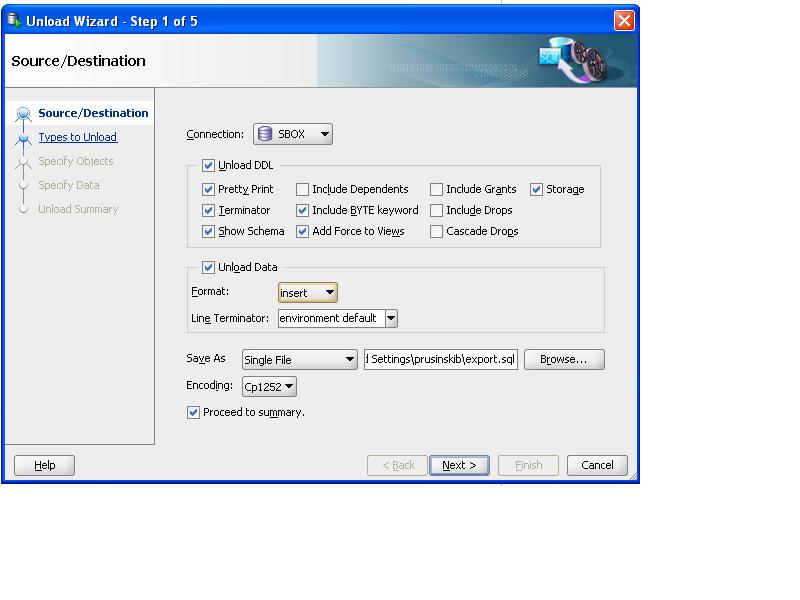
The Unload Wizard is interesting tool which I plan to explore and test in the future. This allows you to dump data in various formats such as XML, PDF and flat file formats.


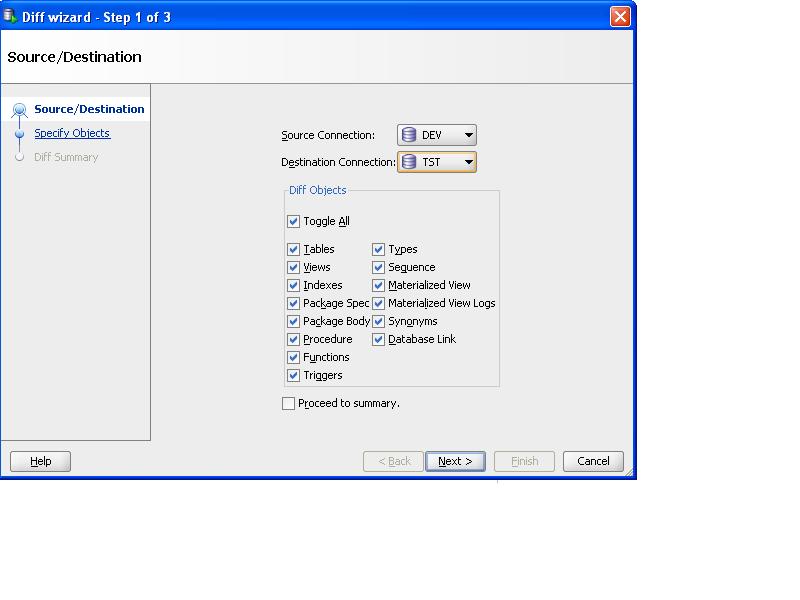
I also like the Diff Wizard tool to check for synchronization issues between database environments. I find this particularly useful after I perform a database refresh to a DEV environment from Production to ensure that the development database is in sync with production. SQL Developer provides a simple option as shown below to perform this task.


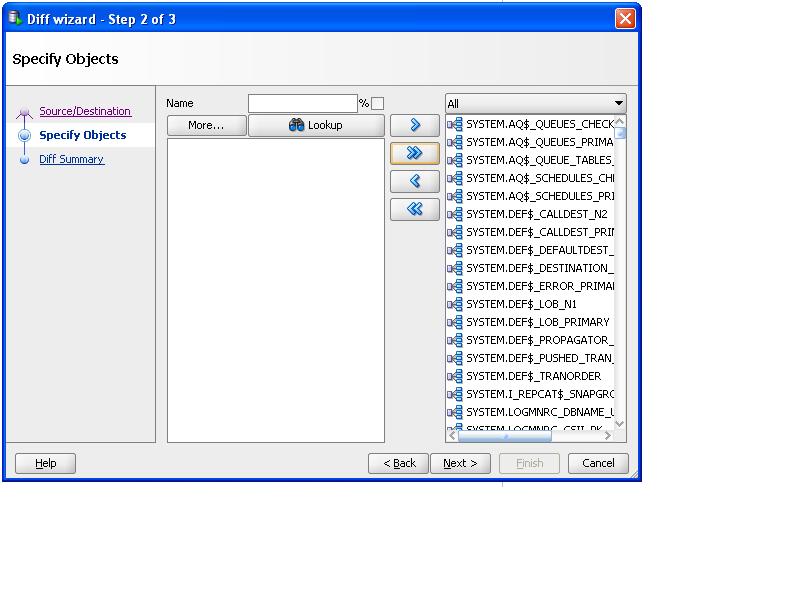
We can choose options for taking the diff in the databases


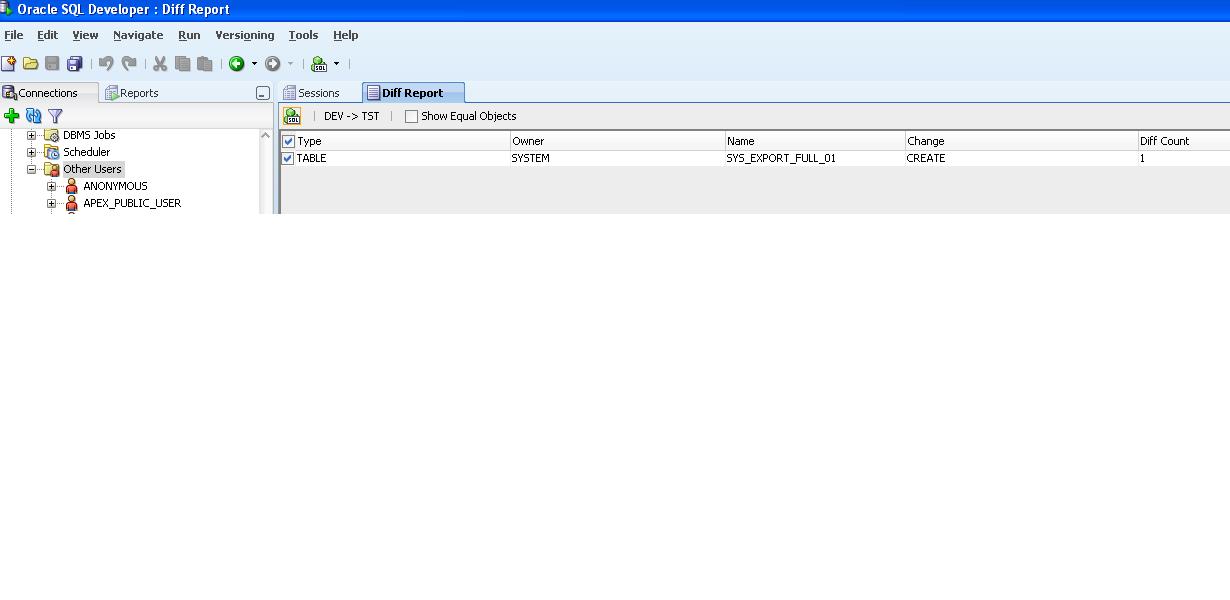
Once the report completes it shows the diff between the two databases:


Finally, with the DBA mindset, I like the monitoring capabilities to view sessions and trace expensive SQL statements. No longer must I use SQL scripts to view SQL statements and explain plans. Its so much easier as shown below.


And last but not least is the way cool search functionality for checking online Oracle documentation and even the Tom Kyte AskTom site:


This makes the latest version of the Oracle SQL Developer tool a one stop center for many development and DBA tasks and best of all, it is FREE!

Cheers,
Ben

Wednesday, December 1, 2010

Oracle R12 E-Business Suite video from OTN LAD Conference

My Oracle R12 E-Business Suite Performance Tuning video from the OTN LAD Conference is now available in Spanish.

http://www.vimeo.com/16914910

Special thanks to fellow Oracle ACE in Peru- Miguel Palacios for the video.

Hope all Oracle users enjoy the video.

Cheers,
Ben

Sunday, November 7, 2010

OTN LAD Tour: Peru, Chile and Uruguay

Dear readers,

After an exciting trip to Peru, Chile, and Uruguay, I wanted to relay the wonderful experience that was the first ever OTN LAD Tour conference which spanned seven countries: Peru, Chile, Uruguay, Brazil, Colombia, Ecuador and Costa Rica. I want to extend my thanks to our most gracious hosts in these countries who not only worked hard behind the scenes to make this conference a success but welcome all of us Oracle ACEs to their countries with their hospitality!

Side trip before the conference.

The weekend before I arrived at the first conference, I went on a side trip to Cusco and Machu Picchu. Here is the map of the trip.


Needless to say, the adventure to Cusco and Machu Picchu was incredible! From stellar food at the Chicha restaurant in Cusco by famed Peruvian chef, Gaston Acurio to the magic of the Inka trail, there is no words to describe it.


Ceviche is a national dish of marinated seafood in lime juice and quite tasty!
Next up, I ordered the amazing anticuchos (beef hearts grilled to perfection) with various types of corn (maize) and potatos.


To reach the famed city of the Inca, you have to fly into Cusco and take a nice scenic four hour train ride to Aguas Calientes and then a bus ride to the base of Machu Picchu.


Once you arrive at Machu Picchu, its quite a hike up to the top! It was raining a lot and slippery which required a rain coat and extra care to avoid falling to one's death over the steep ledges. The views are simply fantastic and breathtaking!


To see this magic place requires several days to explore every incredible spot in the site!

I also went on a side tour around Cusco with fellow Oracle ACE Directors Hans Forbrich and Daniel Morgan who were gracious to arrange for the tour guide to show us around the fantastic wonders of Cusco. Below is a church that was built on an Incan site.


Peru

First, I met with fellow Oracle ACE Enrique Orbegozo who showed me a wonderful tour and genuine Peruvian hospitality by giving me a tour of Lima and excellent Peruvian cuisine.


Enrique was very gracious and took me to an incredible Peruvian folklore show that night.


PEOUG OTN Conference in Peru

After the amazing trip to Cusco and Machu Picchu, I flew back to Lima for the conference in Peru. Everyone was friendly, helpful and gracious.


Chile and Uruguay were wonderful experiences for me as well and from the bottom of my heart, thank you for your hospitality and it was a pleasure and honor to participate in the OTN LAD Tour.

Cheers,
Ben