Today while checking the status of a four node Oracle 11gR2 RAC environment, I noticed something was wrong with time synchronization between the cluster nodes. Even though I had our system administrator configure NTPD for the environment, the Cluster Verification Utility (CVU) failed on NTPD errors and showed the Cluster Synchronization Services Daemon (CTSSD) in Observer mode when I ran a check of the clock synchronization:
oracle@rac1 ~]$ cluvfy comp clocksync -n all
Verifying Clock Synchronization across the cluster nodes
Checking if Clusterware is installed on all nodes...
Check of Clusterware install passed
Checking if CTSS Resource is running on all nodes...
CTSS resource check passed
Querying CTSS for time offset on all nodes...
Query of CTSS for time offset passed
Check CTSS state started...
CTSS is in Observer state. Switching over to clock synchronization checks using NTP
Starting Clock synchronization checks using Network Time Protocol(NTP)...
NTP Configuration file check started...
NTP Configuration file check passed
Checking daemon liveness...
Liveness check passed for "ntpd"
Check for NTP daemon or service alive passed on all nodes
NTP daemon slewing option check failed on some nodes
Check failed on nodes:
rac1,rac2,rac3,rac4
PRVF-5436 : The NTP daemon running on one or more nodes lacks the slewing option "-x"
Clock synchronization check using Network Time Protocol(NTP) failed
PRVF-9652 : Cluster Time Synchronization Services check failed
Verification of Clock Synchronization across the cluster nodes was unsuccessful on all the specified nodes.
Aha! So CTSSD must have an NTPD server in slewing option mode or it will fail to synchronize the cluster nodes correctly.
The solution to this is to shutdown the Oracle RAC database environment as well as to shutdown ASM and the clusterware and then to restart ntpd on the Oracle RAC cluster nodes and app tier server host with the –x option
Previous to this, I had verified that ntpd was running however it was started by default mode and not with the -x option as shown below:
[root@rac1 ~]# service ntpd status
ntpd (pid 24396) is running...
[root@rac1 ~]# ps -ef|grep ntpd
root 15495 8369 0 09:52 pts/1 00:00:00 grep ntpd
ntp 24396 1 0 Jul11 ? 00:00:00 ntpd -u ntp:ntp -p /var/run/ntpd.pid -g
You can check to see if the -x flag has been set by examination of the /etc/sysconfig/ntpd file.
[root@rac1 ~]# grep OPTIONS /etc/sysconfig/ntpd
OPTIONS="-u ntp:ntp -p /var/run/ntpd.pid"
NTPDATE_OPTIONS=""
I found the following two My Oracle Support (http://support.oracle.com) notes useful while solving this issue with Oracle 11gR2 RAC and time synchronization issues.
MOS 1054006.1- CTSSD Runs in Observer Mode Even Though No Time Sync Software is Running
MOS 1056693.1- How to Configure NTP or Windows Time to Resolve CLUVFY Error PRVF-5436 PRV-9652
Showing posts with label clusterware synchronization. Show all posts
Showing posts with label clusterware synchronization. Show all posts
Tuesday, July 12, 2011

Sunday, May 16, 2010
NTP configuration issues with Oracle 11gR2 RAC setup
During the Grid infrastructure setup for Oracle 11gR2 RAC, I ran into a weird error with ntp not working with the Grid
infrastructure installer.
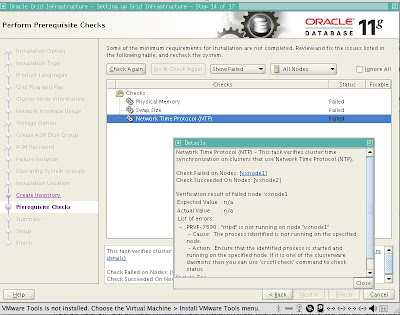
The solution thanks to he Grumpy DBA, better known as Jay Caviness
http://grumpy-dba.com/2009/09/04/slewing-the-11gr2-dragon/
is to edit ntp configuration on both cluster nodes and restart ntp services.
To do so, logon to each node as root and edit the /etc/sysconfig/ntpd configuration file to make change for options settings as shown below:
[root@vxnode2 ntp]# cat /etc/sysconfig/ntpd
# Drop root to id 'ntp:ntp' by default.
OPTIONS="-u ntp:ntp -p /var/run/ntpd.pid"
# Set to 'yes' to sync hw clock after successful ntpdate
SYNC_HWCLOCK=no
# Additional options for ntpdate
NTPDATE_OPTIONS=""
OPTIONS="-x -u ntp:ntp -p /var/run/ntpd.pid"
You will need to restart ntp services for this to take affect:
root@vxnode2 ntp]# service ntpd stop
Shutting down ntpd: [ OK ]
[root@vxnode2 ntp]# service ntpd start
ntpd: Synchronizing with time server: [ OK ]
Starting ntpd: [ OK ]
[root@vxnode2 ntp]# ps -ef|grep ntp
root 7363 1 0 03:51 ? 00:00:00 ntpd -x -u ntp:ntp -p /var/run/ntpd.pid
Now we can move forward in the 11gR2 RAC Grid Infrastructure setup.
Be aware that since we are using virtualization for 11gR2 RAC with VMware, you may need to restart the ntp services each time that you power on the VMs. Another option around this issue with ntp is to use the Oracle 11gR2 RAC cluster synchronization services (CSS) instead of ntp to let Oracle handle the network synchronization services for the cluster.
Configure Cluster Time Synchronization Service - (CTSS)
If you want to use Cluster Time Synchronization Service to do this, you need to remove your ntp configuration and shutdown the ntp services on both cluster nodes.
To deactivate the NTP service, you need to shutdown and disable the existing ntpd service, and remove the ntp.conf file. To complete these steps on CentOS Linux, run the following commands as the root user on both cluster nodes:
1) /sbin/service ntpd stop
2) chkconfig ntpd off
3) mv /etc/ntp.conf /etc/ntp.conf.original
4) Delete the following file:
rm /var/run/ntpd.pid
This file maintains the pid for the NTP daemon.
When the installer finds that the NTP protocol is not active, the Cluster Time Synchronization Service is automatically installed in active mode and synchronizes the time across the nodes. If NTP is found configured, then the Cluster Time Synchronization Service is started in observer mode, and no active time synchronization is performed by Oracle Clusterware within the cluster.
To confirm that ctssd is active after installation, enter the following command as the Grid installation owner (grid):
1) crsctl check ctss
CRS-4701: The Cluster Time Synchronization Service is in Active mode.
CRS-4702: Offset (in msec): 0
Thanks to Jeffrey Hunter for these tips. He has an excellent writeup for 11gR2 RAC with iSCSI:
http://www.oracle.com/technology/pub/articles/hunter-rac11gr2-iscsi.html#10
Next we will take a look at how to resolve issues with iSCSI disks not accessed by the 11gR2 RAC Grid infrastructure setup program.
infrastructure installer.

The solution thanks to he Grumpy DBA, better known as Jay Caviness
http://grumpy-dba.com/2009/09/04/slewing-the-11gr2-dragon/
is to edit ntp configuration on both cluster nodes and restart ntp services.
To do so, logon to each node as root and edit the /etc/sysconfig/ntpd configuration file to make change for options settings as shown below:
[root@vxnode2 ntp]# cat /etc/sysconfig/ntpd
# Drop root to id 'ntp:ntp' by default.
OPTIONS="-u ntp:ntp -p /var/run/ntpd.pid"
# Set to 'yes' to sync hw clock after successful ntpdate
SYNC_HWCLOCK=no
# Additional options for ntpdate
NTPDATE_OPTIONS=""
OPTIONS="-x -u ntp:ntp -p /var/run/ntpd.pid"
You will need to restart ntp services for this to take affect:
root@vxnode2 ntp]# service ntpd stop
Shutting down ntpd: [ OK ]
[root@vxnode2 ntp]# service ntpd start
ntpd: Synchronizing with time server: [ OK ]
Starting ntpd: [ OK ]
[root@vxnode2 ntp]# ps -ef|grep ntp
root 7363 1 0 03:51 ? 00:00:00 ntpd -x -u ntp:ntp -p /var/run/ntpd.pid
Now we can move forward in the 11gR2 RAC Grid Infrastructure setup.
Be aware that since we are using virtualization for 11gR2 RAC with VMware, you may need to restart the ntp services each time that you power on the VMs. Another option around this issue with ntp is to use the Oracle 11gR2 RAC cluster synchronization services (CSS) instead of ntp to let Oracle handle the network synchronization services for the cluster.
Configure Cluster Time Synchronization Service - (CTSS)
If you want to use Cluster Time Synchronization Service to do this, you need to remove your ntp configuration and shutdown the ntp services on both cluster nodes.
To deactivate the NTP service, you need to shutdown and disable the existing ntpd service, and remove the ntp.conf file. To complete these steps on CentOS Linux, run the following commands as the root user on both cluster nodes:
1) /sbin/service ntpd stop
2) chkconfig ntpd off
3) mv /etc/ntp.conf /etc/ntp.conf.original
4) Delete the following file:
rm /var/run/ntpd.pid
This file maintains the pid for the NTP daemon.
When the installer finds that the NTP protocol is not active, the Cluster Time Synchronization Service is automatically installed in active mode and synchronizes the time across the nodes. If NTP is found configured, then the Cluster Time Synchronization Service is started in observer mode, and no active time synchronization is performed by Oracle Clusterware within the cluster.
To confirm that ctssd is active after installation, enter the following command as the Grid installation owner (grid):
1) crsctl check ctss
CRS-4701: The Cluster Time Synchronization Service is in Active mode.
CRS-4702: Offset (in msec): 0
Thanks to Jeffrey Hunter for these tips. He has an excellent writeup for 11gR2 RAC with iSCSI:
http://www.oracle.com/technology/pub/articles/hunter-rac11gr2-iscsi.html#10
Next we will take a look at how to resolve issues with iSCSI disks not accessed by the 11gR2 RAC Grid infrastructure setup program.
Subscribe to:
Posts (Atom)