Thursday, March 29, 2012

Upgrading Oracle VM 3.0.3 to latest patchset

Recently I had to upgrade an older version of Oracle VM 3.0 to the latest patch version to resolve some bugs in the initial releases of OVM 3.0. Below are the steps that I followed to perform the upgrade.


1. Download the patchset from Oracle Support (http://support.oracle.com)
2. Unzip the patch to the OVM Manager /tmp directory
3. backup config files for OVM Manager:

. Back up/copy the Oracle VM Manager configuration file located at:
# /u01/app/oracle/ovm-manager-3/.config

4. Mount the ISO image for the upgrade:

# mount -o loop V29654-01.iso /mnt
# cd /mnt
# ls
components runUpgrader.sh upgrade
#

Upgrade OVM 3.x to OVM 3.0.3:

# ./runUpgrader.sh
Oracle VM Manager 3.0.3.126 upgrade util

Oracle VM Manager is running ...

Verifying installation status ...
Read Oracle VM Manager config file ...
Skipping database upgrade for the same product version (3.0.3 to 3.0.3)
Found Oracle VM Manager install files ...
Found Oracle VM Manager upgrader ...
Found Oracle WebLogic Server ...
Found Java ...
Using the following information :
Database Host : localhost
Database SID : XE
Database LSNR : 1521
Oracle VM Schema : ovs
Oracle VM Manager UUID : 0004fb00000100004bd6b7c313170105
Current Build ID : 3.0.3.126
Using /tmp/workdir.hcUHL29831 for backup and export location.
Using /tmp/patchdir.Rvea29832 for patching.
Undeploying previous version of Oracle VM Manager application ...
Undeploying Oracle VM Manager help ...

Note: make sure that OVM Manager is up and running during the upgrade!

Once completed, the version should look like this:


In my next series of posts for OVM 3.0.3, I will discuss how to deploy Oracle 11gR2 RAC environment as well as use the new features for OVM 3.0.3 such as live migration and converting P2V- physical to virtual as well as managing an OVM 3.x environment.

Uploading templates for OVM 3.0.3 to ftp server

Dear readers,

Its been a while since I've blogged due to many busy demands between work, finishing a new Oracle book and scuba diving. Recently, I setup a new Oracle VM 3.0.3 environment and the interface and tools have changed quite a bit since I last worked with OVM 2.2 version. One challenge is that now in OVM 3.0.3 you have to upload the VM templates via a web http or ftp server and no longer can you copy the Oracle VM templates over to the /OVS/seed_pool directory on the OVM server. In my case, I hit a wall of frustration trying to import a template for OVM 3.0.3 via a Windows FTP server. The solution for importing Oracle VM 3.0.3 templates into OVM manager is to use the following ftp string:


ftp://domainname%5Cusername:password@url-path

in our case we have:

ftp://oraben%5Coracle:mypassword@winftpserver.benoracle.com/V25331-01.zip

In my experience, OVM Manager prefers that you use the root base directory of the ftp server.
Otherwise you will have server access denied errors and the template import operation will fail.

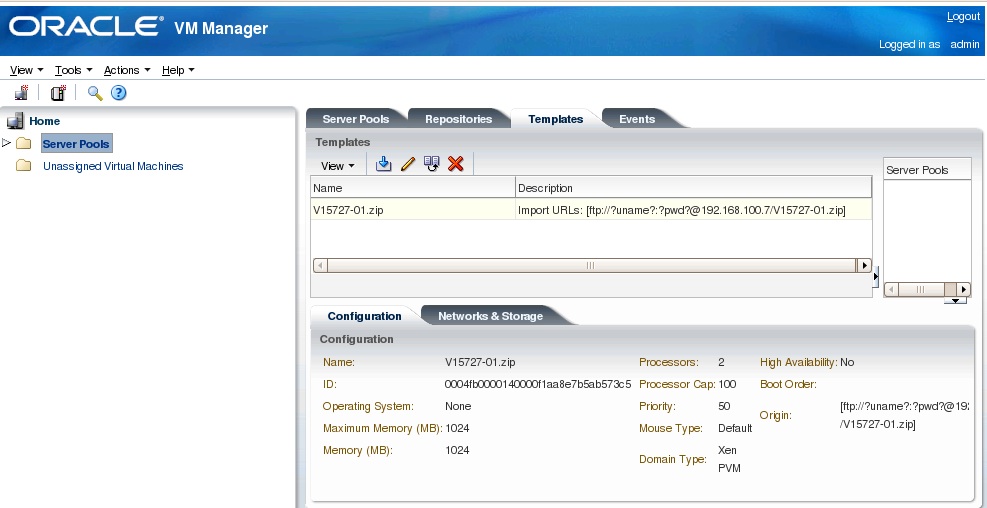
Once you have imported the template into OVM 3.0.3 you will see a screen similar to the following:


Hope this helps. Stay tuned for a continuation of my series on tips and tricks for Oracle VM 3.0.3

Monday, November 28, 2011

How to fix archive stuck error with Oracle 11gR2

Recently, I encountered an issue with Oracle R12 EBS environment unable to login to database tier with APPS schema with our Oracle 11gR2 database tier.

ORA-00257: archiver error. Connect internal only, until freed.

Sure enough, upon examination of the ADRCI alert.log entries, I found this:

* 2011-10-27 16:24:51.990 4265 krsh.c
ARC1: Error 19809 Creating archive log file to '+FRA'
*** 2011-10-27 16:24:51.990 2864 krsi.c
krsi_dst_fail: dest:1 err:19809 force:0 blast:1
DDE rules only execution for: ORA 312
----- START Event Driven Actions Dump ----
---- END Event Driven Actions Dump ----
----- START DDE Actions Dump -----
Executing SYNC actions
----- START DDE Action: 'DB_STRUCTURE_INTEGRITY_CHECK' (Async) -----
Successfully dispatched
----- END DDE Action: 'DB_STRUCTURE_INTEGRITY_CHECK' (SUCCESS, 0 csec) -----
Executing ASYNC actions
----- END DDE Actions Dump (total 0 csec) -----
DDE: Problem Key 'ORA 312' was flood controlled (0x5) (no incident)
ORA-00312: online log 2 thread 3: '+DATA/vis/onlinelog/group_2.259.743840813'
ORA-00312: online log 2 thread 3: '+FRA/vis/onlinelog/group_2.259.743840815'

Solution:
The Fast Recovery Area (FRA) is full with old archive log files so we need to clean this up by removing old archive logs.
If you have production environment, back these up to tape or storage for recovery and archival purposes.

Login to RMAN and run the following commands:

RMAN> CONNECT target /

connected TO target DATABASE: INSTANT (DBID=1234567890)

RMAN> crosscheck archivelog ALL;

Note: You can schedule this command once a week.
The crosscheck command does NOT DELETE the information about the logs that it
could NOT find ON disk, it just updates their STATUS IN the repository AS 'EXPIRED'.
TO obtain a list OF logs marked AS 'EXPIRED' USE the following command:

RMAN> list expired archivelog ALL;

IF it IS NOT necessary TO keep the information about these
logs IN the repository, DELETE them WITH command:

RMAN> DELETE expired archivelog ALL;


RMAN> delete archivelog all completed before 'SYSDATE-1';

The above RMAN command will delete old archive logs past 24 hours.

Now you should be able to connect to the database.


Below are some useful queries to check on FRA available space:

SQL> SELECT name, free_mb, total_mb, free_mb/total_mb*100 "%" FROM v$asm_diskgroup;

NAME FREE_MB TOTAL_MB %
------------------------------ ---------- ---------- ----------
DATA 823641 1044450 78.8588252
FRA 207743 511992 40.5754387
LOG 306958 307191 99.9241514


SQL>

set lines 100
col name format a60
select name
, floor(space_limit / 1024 / 1024) "Size MB"
, ceil(space_used / 1024 / 1024) "Used MB"
from v$recovery_file_dest
order by name
/


NAME Size MB Used MB
------------------------------------------------------------ ---------- ----------
+FRA 102400 302965


If you want to change the default size for the FRA you can issue the following command from SQL*PLUS:

SQL> alter system set db_recovery_file_dest_size=600G;

System altered.

Then you should archive logs:
SQL> archive log all;
3 logs archived.

Sunday, October 16, 2011

My review Oracle OpenWorld 2011

Dear readers,

Oracle OpenWorld 2011 was a fantastic event with many new product announcements including Oracle Public Cloud as well as Oracle Big Data Appliances along with Exalytics for Business Intelligence. Before the conference, I had the pleasure of attending the Oracle ACE Director briefing at Oracle HQ in Redwood Shores under NDA to learn of new developments at Oracle.

After the ACED briefing, I headed to San Francisco with my fellow Oracle ACE Director, Arup Nanda and we checked into the Hilton Hotel. The computers failed during checkin so we had the keep the patience of a saint which paid off with a free complimentary full breakfast. My hotel room had the most amazing view of the entire San Francisco Bay area including views of the Golden Gate bridge and Alcatraz island!


My favorite part of the conference was meeting new people and the special interest groups (SIG) for virtualization with Oracle. I had a great time meeting a lot of Oracle gurus including Jonathan Lewis, Tim Gorman, Doug Burns, James Morle, Michael Abbey, and my co-author Syed Jaffar Hussein of my Oracle 11g RAC book as well as James and Kerry from PACKT Press. Some more cool things at OOW this year was the America's cup winning yacht:


This year we had a great time at OTN night and the appreciation event was wonderful with Sting in concert. Funny because it seemed like Sting was singing in slow motion on songs like Roxanne!


The lightshow with Sting was incredible!


On Tuesday, I delivered my session on database security and would like to thank the 400+ attendees who came to my session. I do hope it was informative and useful to your journey to implementing security for your Oracle environments. The weather was a bit challenging with lots of rain and cold this year.


Fortunately I had an umbrella to keep me dry.
I would like to thank Justin, Lillian, and Vikki for all their hard work to make the OOW conference and ACE briefing a total victory and success this year.

Wednesday, September 28, 2011

OpenWorld 2011

Dear readers,

It is rapidly approaching time again for one of the best technical conferences, Oracle OpenWorld!

Come learn how to secure your Oracle database environment with new features at my session next week.

Session ID: 02180
Session Title: Lockdown: Secure Your Database in a Day
Room: Moscone South- 303
Date/Time: 10/4/11, 11:45-12:45

I will also be hosting a book signing after the event in the Oracle bookstore at OpenWorld. Hope to see everyone there.

Cheers,
Ben

Tuesday, September 20, 2011

Howto- Install Oracle 11g Grid Control Enterprise Manager (OEM) Server

With the new features for Oracle 11g Grid Control Enterprise Manager (OEM), it is valuable tool now for managing large Oracle environments. I recall from Oracle 9i OEM days that it was a buggy tool and back then years ago, I used SQL*Plus and command line tools. However, in 11gR1, OEM has emerged as an excellent monitoring tool. I still use command line tools most of the time but for monitoring, its a great product. With that said, let's get started in building a new Oracle11gR1 Grid Control Enterprise Manager (OEM) environment on Linux!

Preparation

OEM 11g Grid Control server is a resource hog and requires A LOT more memory than 10g OEM Grid Control so make sure you allocate a new server with at least 16GB of RAM or you will have performance issues.

Summary of Steps

1. Download the OEM 11g Grid Control software from Oracle Edelivery or OTN site (otn.oracle.com)
2. Download Oracle Weblogic 10.3.2 Server

Note; DO NOT use later version of Weblogic as this will NOT work with setup for 11g Grid Control Server!

3. Download Java JDK version 1.6 or later
4. Download required packages for Linux


Setup Java and Weblogic:


1. install and configure java

export PATH=$PATH:/usr/local/jdk/jdk1.5.0_10/bin

2. install and setup oem grid database
In our case, we used Oracle 11.2.0.2 database for the repository with Grid Control

3. post-db config tasks

$ emca -deconfig dbcontrol db -repos drop -SYS_PWD -SYSMAN_PWD

Login to the OEM repository Oracle 11gR2 database
Make the following initialization parameter changes.

sqlplus / AS SYSDBA

ALTER SYSTEM SET log_buffer=10485760 SCOPE=SPFILE;
ALTER SYSTEM SET processes=500 SCOPE=SPFILE;
ALTER SYSTEM SET session_cached_cursors=200 SCOPE=SPFILE;

In another shell window, un-install the database control:

$ emca -deconfig dbcontrol db -repos drop -SYS_PWD oracle -SYSMAN_PWD oracle

STARTED EMCA at Sep 3, 2011 11:43:41 AM
EM Configuration Assistant, Version 11.2.0.0.2 Production
Copyright (c) 2003, 2005, Oracle. All rights reserved.

Enter the following information:
Database SID: oem
Listener port number: 1521

----------------------------------------------------------------------
WARNING : While repository is dropped the database will be put in quiesce mode.
----------------------------------------------------------------------
Do you wish to continue? [yes(Y)/no(N)]: Y
Sep 3, 2011 11:43:54 AM oracle.sysman.emcp.EMConfig perform
INFO: This operation is being logged at /u01/app/oracle/cfgtoollogs/emca/oem/emca_2011_09_03_11_43_41.log.
Sep 3, 2011 11:43:54 AM oracle.sysman.emcp.util.DBControlUtil stopOMS
INFO: Stopping Database Control (this may take a while) ...
Sep 3, 2011 11:44:15 AM oracle.sysman.emcp.EMReposConfig invoke
INFO: Dropping the EM repository (this may take a while) ...
Sep 3, 2011 11:45:23 AM oracle.sysman.emcp.EMReposConfig invoke
INFO: Repository successfully dropped
Enterprise Manager configuration completed successfully
FINISHED EMCA at Sep 3, 2011 11:45:25 AM


4. Install weblogic server 10.3.2

$ java -d64 -jar wls1032_generic.jar


5. Apply patch for weblogic

Next we must apply the "WDJ7" patch to the installation by running the Smart Update utility.

Notes:

The installation will complete without this patch, so if you have any trouble you can ignore it.
Newer versions of the Smart Update utility no longer allow you to download patches using the utility itself. For the revised patch download instructions see MOS Notes 876004.1 and 1302053.1.

download patch from MOS site

unzip p9438213_10320_Generic.zip -d /u01/weblogic/utils/bsu/cache_dir

Execute the following command to apply the Weblogic patch with the BSU utility:

Syntax:
./bsu.sh -prod_dir= -patch_download_dir= -status=downloaded -view -verbose

For example:
./bsu.sh -prod_dir=/opt/bea/weblogic92 -patch_download_dir=/opt/bea/utils/bsu/cache_dir -status=downloaded -view -verbose

This is the syntax for the command to install a patch:

./bsu.sh -prod_dir=/u01/weblogic -patchlist=WDJ7 -verbose -install

This is the syntax for the command to check if the patch is installed:
./bsu.sh -prod_dir= -patch_download_dir= -status=applied -verbose -view

For example:
./bsu.sh -prod_dir=/opt/bea/weblogic92 -status=applied -verbose -view

$ cd /u01/app/oracle/Middleware/utils/bsu
$ sh bsu.sh
Update the patch client by clicking the "OK" button on the message dialog.


./bsu.sh -prod_dir=/u01/weblogic/wlserver_10.3 -patch_download_dir=/u01/weblogic/utils/bsu -patchlist=4D53,NIXN,XLXA -verbose -install

./bsu.sh -prod_dir=/u01/weblogic/wlserver_10.3 -patch_download_dir=/u01/weblogic/utils/bsu -patchlist=WDJ7 -verbose -install


Unable to apply patch for weblogic 10.3.2 server

Oh no Mr. Bill! We hit a Weblogic bug! Seems like the BSU utility does not play well with some online systems. So, we tried the following approach:

$ ./bsu.sh -prod_dir=/u01/weblogic/wlserver_10.3 -patch_download_dir=/u01/weblogic/utils/bsu -patchlist=4D53,NIXN,XLXA -verbose -install


Encountered unrecognized patch ID: 4D53
Encountered unrecognized patch ID: NIXN
Encountered unrecognized patch ID: XLXA


$ ./bsu.sh -view -patch_download_dir=/u01/weblogic/utils/bsu/cache_dir -status=applied -verbose -prod_dir=/u01/weblogic/wlserver_10.3
ProductName: WebLogic Server
ProductVersion: 10.3 MP2
Components: WebLogic Server/Core Application Server,WebLogic Server/Admi
nistration Console,WebLogic Server/Configuration Wizard and
Upgrade Framework,WebLogic Server/Web 2.0 HTTP Pub-Sub Serve
r,WebLogic Server/WebLogic SCA,WebLogic Server/WebLogic JDBC
Drivers,WebLogic Server/Third Party JDBC Drivers,WebLogic S
erver/WebLogic Server Clients,WebLogic Server/WebLogic Web S
erver Plugins,WebLogic Server/UDDI and Xquery Support,WebLog
ic Server/Workshop Code Completion Support
BEAHome: /u01/weblogic
ProductHome: /u01/weblogic/wlserver_10.3
PatchSystemDir: /u01/weblogic/utils/bsu
PatchDir: /u01/weblogic/patch_wls1032
Profile: Default
DownloadDir: /u01/weblogic/utils/bsu/cache_dir
JavaVersion: 1.6.0_14
JavaVendor: Sun


Let's Fix this issue with apply Weblogic Patch:

Solution: rename patch-catalog-

I found the answer on the OTN Oracle forums:

https://forums.oracle.com/forums/thread.jspa?threadID=1064396

Now, this is not supported by Oracle so you should not do this in a production environment without guidance of Oracle support! Since we are doing a test setup, we can experiment!


$ mv patch-catalog_15563.xml patch-catalog.xml
$ cd ..
$ ./bsu.sh -prod_dir=/u01/weblogic/wlserver_10.3 -patch_download_dir=/u01/weblogic/utils/bsu/cache_dir -patchlist=4D53,NIXN,XLXA -verbose -install
Checking for conflicts..
No conflict(s) detected

Starting installation of Patch ID: 4D53
Installing /u01/weblogic/utils/bsu/cache_dir/4D53.jar
Extracting /u01/weblogic/patch_wls1032/patch_jars/Bug9100465_1032.jar
Updating /u01/weblogic/patch_wls1032/profiles/default/sys_manifest_classpath/weblogic_patch.jar
Old manifest value: Class-Path=
New manifest value: Class-Path=../../../patch_jars/Bug9100465_1032.jar
Result: Success

Starting installation of Patch ID: NIXN
Installing /u01/weblogic/utils/bsu/cache_dir/NIXN.jar
Extracting /u01/weblogic/patch_wls1032/patch_jars/bug8990616_1032.jar
Updating /u01/weblogic/patch_wls1032/profiles/default/sys_manifest_classpath/weblogic_patch.jar
Old manifest value: Class-Path=../../../patch_jars/Bug9100465_1032.jar
New manifest value: Class-Path=../../../patch_jars/bug8990616_1032.jar ../../../patch_jars/Bug9100465_1032.jar
Result: Success

Starting installation of Patch ID: XLXA
Installing /u01/weblogic/utils/bsu/cache_dir/XLXA.jar
Extracting /u01/weblogic/patch_wls1032/patch_jars/Bug9221722_1032.jar
Updating /u01/weblogic/patch_wls1032/profiles/default/sys_manifest_classpath/weblogic_patch.jar
Old manifest value: Class-Path=../../../patch_jars/bug8990616_1032.jar ../../../patch_jars/Bug9100465_1032.jar
New manifest value: Class-Path=../../../patch_jars/Bug9221722_1032.jar ../../../patch_jars/bug8990616_1032.jar ../../../patch_jars/Bug9100465_1032.jar
Result: Success


Verify weblogic patch was installed successfully


Ok, lets verify again that the Weblogic Patch was applied:

$ ./bsu.sh -view -patch_download_dir=/u01/weblogic/utils/bsu/cache_dir -status=applied -verbose -prod_dir=/u01/weblogic/wlserver_10.3

ProductName: WebLogic Server
ProductVersion: 10.3 MP2
Components: WebLogic Server/Core Application Server,WebLogic Server/Admi
nistration Console,WebLogic Server/Configuration Wizard and
Upgrade Framework,WebLogic Server/Web 2.0 HTTP Pub-Sub Serve
r,WebLogic Server/WebLogic SCA,WebLogic Server/WebLogic JDBC
Drivers,WebLogic Server/Third Party JDBC Drivers,WebLogic S
erver/WebLogic Server Clients,WebLogic Server/WebLogic Web S
erver Plugins,WebLogic Server/UDDI and Xquery Support,WebLog
ic Server/Workshop Code Completion Support
BEAHome: /u01/weblogic
ProductHome: /u01/weblogic/wlserver_10.3
PatchSystemDir: /u01/weblogic/utils/bsu
PatchDir: /u01/weblogic/patch_wls1032
Profile: Default
DownloadDir: /u01/weblogic/utils/bsu/cache_dir
JavaVersion: 1.6.0_14
JavaVendor: Sun


Patch ID: 4D53
PatchContainer: 4D53.jar
Checksum: -653702491
Severity: optional
Category: Web App
CR/BUG:
Restart: true
Description: weblogic http client implementation, does not handle keepali
ve conf (http1.0)

Patch ID: NIXN
PatchContainer: NIXN.jar
Checksum: -1413651003
Severity: optional
Category: Core
CR/BUG:
Restart: true
Description: Connecting to wls with non-ssl IIOP port fails if the port i
s enabled on a server running without a non-ssl IIOP channel
.

Patch ID: XLXA
PatchContainer: XLXA.jar
Checksum: 1670664663
Severity: optional
Category: Web App
CR/BUG:
Restart: true
Description: Jsp compiler shouldn't recompile jsp page when page-check-se
conds is set to -1


Whew! Now, that we have Weblogic 10.3.2 installed and patched, we need to change settings and resize the OEM 11g Grid Control repository database.

Resize undo tablespace to 500G


To avoid an error during installation for Grid Control, you need to resize the undo tablespace.

select file_name from dba_data_files where tablespace_name ='UNDOTBS1';


FILE_NAME
--------------------------------------------------------------------------------
/u01/app/oracle/oradata/oem/undotbs01.dbf


Then we alter the size of the undo tablespace file, set autoextend on and maxsize to unlimited:

SQL> select file_name from dba_data_files where tablespace_name ='UNDOTBS1';

FILE_NAME
--------------------------------------------------------------------------------
/u01/app/oracle/oradata/oem/undotbs01.dbf

SQL> alter database datafile '/u01/app/oracle/oradata/oem/undotbs01.dbf' resize 1500M;

Database altered.

SQL> alter database datafile '/u01/app/oracle/oradata/oem/undotbs01.dbf' autoextend on maxsize unlimited;

Database altered.


Start the OEM 11g Grid Control installation program with ./runInstaller


I will spare you the screenshots as these are available online in the Oracle 11g Grid Control installation documentation and also at Dr. Tim Hall's blog at http://www.oracle-base.com/articles/11g/GridControl11gR1InstallationOnOEL5.php

Once the Grid Control setup completes, take down the following information for reference:

1. Enterprise Manager Grid Control URL: https://oem:7799/em
2. Admin Server URL: https://oem:7101/console

The following details need to be provided during the additional OMS install:

1. Admin Server Hostname: oem
2. Admin Server Port: 7101


Special thanks to Dr. Tim Hall for his excellent blog spot and walk through on 11g Grid Control. As you can see, Oracle 11gR1 Grid Control is far more resource intensive to setup and run than previous versions.

Oracle 11gR1 Grid Control Enterprise Manager Collection fails

Recently we had issue with Oracle 11g Enterprise Manager (OEM) Grid control failing to collect up to data host data with following error from Grid Control:


This was a cryptic error and after research, we found the solution in the following My Oracle Support:

Note: 271598.1
Grid Agent Configuration: Certain Operations from Grid Console Fail With 'ERROR: NMO Not Setuid-root (Unix-only)'

So, I performed the following steps to resolve the issue with Oracle 11g Grid Control:

./emctl stop agent
Oracle Enterprise Manager 11g Release 1 Grid Control 11.1.0.1.0
Copyright (c) 1996, 2010 Oracle Corporation. All rights reserved.
Stopping agent ... stopped.


Open a new shell window logged in as the root user:

# cd /home/oracle/agent11g/
# ./root.sh

As the oracle user, start the agent on the monitored host:

$ ./emctl start agent
Oracle Enterprise Manager 11g Release 1 Grid Control 11.1.0.1.0
Copyright (c) 1996, 2010 Oracle Corporation. All rights reserved.
Starting agent ....... started.


Now comes the secret sauce or step that solves issue:


./emctl control agent runcollection rac1:host host_storage
Oracle Enterprise Manager 11g Release 1 Grid Control 11.1.0.1.0
Copyright (c) 1996, 2010 Oracle Corporation. All rights reserved.
---------------------------------------------------------------
EMD runCollection completed successfully

In the above command emctl control agent runcollection hostname:host host_storage
you will update the details sent to the OEM 11g Grid Control server.


Perform upload to OEM 11g Grid Control Server:


$ ./emctl upload
Oracle Enterprise Manager 11g Release 1 Grid Control 11.1.0.1.0
Copyright (c) 1996, 2010 Oracle Corporation. All rights reserved.
---------------------------------------------------------------
EMD upload completed successfully

Verify it has resolved issue. You will see the current host status as shown in the below example:


Stay tuned for more Oracle 11g Grid control tips. I will share my lessons learned next for the installation process with Oracle 11gR1 Grid Control Server.