Dear Readers,
I have become an Oracle ACE Director!
Even more exciting news is that I will be presenting at Oracle OpenWorld this year. Below are the details:
Session ID: S319054
Title: Oracle E-Business Suite 12 Performance Tuning 101
Abstract:
In this session, learn how to approach performance tuning issues in both proactive and reactive modes for all components of the complex Oracle E-Business Suite 12 environment. Discover the latest performance tuning methods and tools for the application and database tiers with Oracle E-Business Suite. Learn how to tune the concurrent manager, application-tier components, the Java Virtual Machine (JVM), and database tier servers.
Speaker(s): Ben Prusinski, Ben Prusinski and Associates, President and Chief Architect
Stream(s): APPLICATIONS
Track(s): Applications Tools and Technology, Oracle E-Business Suite
Schedule: Monday, September 20, 12:30 | Marriott Marquis, Golden Gate C2
Hope to see everyone there! I will also be answering your technical Oracle questions at the Oracle OTN ACE Lounge as well.
Monday, August 30, 2010

Thursday, August 19, 2010
Plagiarism and Oracle RAC book update
It has been found that Guenadi Jilevski has plagiarized dozens of others work on Oracle blogs and websites as shown below:
From the September 2009 archive, virtually all of the content has been pasted-in from other sources and represented as his own work.
http://gjilevski.wordpress.com/2009/11/24/upgrade-oracle-crs-10-2-to-oracle-grid-11-2/
Stolen from Martin Casterbach:
http://martincarstenbach.wordpress.com/2010/01/21/upgrade-clusterware-10-2-to-11-2/
************************
http://gjilevski.wordpress.com/2009/09/29/edition-based-redefinition-in-oracle-database-11g-release-2/
Stolen from Dr. Hall:
http://www.oracle-base.com/articles/11g/EditionBasedRedefinition_11gR2.php
************************
http://gjilevski.wordpress.com/2009/09/25/install-oracle-11-2-rac-deploying-dns-dhcp-for-gns/
Stolen from Martin Casterbach:
http://martincarstenbach.wordpress.com/2009/10/02/build-your-own-11-2-rac-system-part-ii-dns-dhcp-for-gns/
************************
http://gjilevski.wordpress.com/2009/09/23/install-oracle-11-2-rac-using-dns-for-scan/
Stolen from Martin Casterbach:
http://martincarstenbach.wordpress.com/2009/09/26/build-your-own-11-2-rac-system-part-i-dns/
**********************************
http://gjilevski.wordpress.com/2009/09/04/oracle-11gr2-is-out/
Stolen from Arup Nanda:
http://arup.blogspot.com/2009/09/oracle-11g-r2-features.html
**********************************
http://gjilevski.wordpress.com/2009/10/22/dbms_parallel_execute/
Stolen from Hall:
http://www.oracle-base.com/articles/11g/dbms_parallel_execute_11gR2.php
**********************************
http://gjilevski.wordpress.com/2009/10/13/adding-node-in-oracle-11g-r2-grid-infrastructure/
Stolen from Martin Casterbach:
http://martincarstenbach.wordpress.com/tag/11-2/
Needless to say, I have ended all professional dealings with Jilevski. As for my new Oracle 11g RAC book with PACKT Press, my chapters are listed below:
Chapter 1: Introduction
Chapter 2: Architecture
Chapter 5: Managing and Troubleshooting Oracle 11g Clusterware
Chapter 14: Maximum Availability
Appendices
From the September 2009 archive, virtually all of the content has been pasted-in from other sources and represented as his own work.
http://gjilevski.wordpress.com/2009/11/24/upgrade-oracle-crs-10-2-to-oracle-grid-11-2/
Stolen from Martin Casterbach:
http://martincarstenbach.wordpress.com/2010/01/21/upgrade-clusterware-10-2-to-11-2/
************************
http://gjilevski.wordpress.com/2009/09/29/edition-based-redefinition-in-oracle-database-11g-release-2/
Stolen from Dr. Hall:
http://www.oracle-base.com/articles/11g/EditionBasedRedefinition_11gR2.php
************************
http://gjilevski.wordpress.com/2009/09/25/install-oracle-11-2-rac-deploying-dns-dhcp-for-gns/
Stolen from Martin Casterbach:
http://martincarstenbach.wordpress.com/2009/10/02/build-your-own-11-2-rac-system-part-ii-dns-dhcp-for-gns/
************************
http://gjilevski.wordpress.com/2009/09/23/install-oracle-11-2-rac-using-dns-for-scan/
Stolen from Martin Casterbach:
http://martincarstenbach.wordpress.com/2009/09/26/build-your-own-11-2-rac-system-part-i-dns/
**********************************
http://gjilevski.wordpress.com/2009/09/04/oracle-11gr2-is-out/
Stolen from Arup Nanda:
http://arup.blogspot.com/2009/09/oracle-11g-r2-features.html
**********************************
http://gjilevski.wordpress.com/2009/10/22/dbms_parallel_execute/
Stolen from Hall:
http://www.oracle-base.com/articles/11g/dbms_parallel_execute_11gR2.php
**********************************
http://gjilevski.wordpress.com/2009/10/13/adding-node-in-oracle-11g-r2-grid-infrastructure/
Stolen from Martin Casterbach:
http://martincarstenbach.wordpress.com/tag/11-2/
Needless to say, I have ended all professional dealings with Jilevski. As for my new Oracle 11g RAC book with PACKT Press, my chapters are listed below:
Chapter 1: Introduction
Chapter 2: Architecture
Chapter 5: Managing and Troubleshooting Oracle 11g Clusterware
Chapter 14: Maximum Availability
Appendices
Tuesday, August 17, 2010
Recent issue of blogs and copyright
Dear readers,
I recently had a major issue come to light when one of my co-authors for the newly released Oracle 11g Real Application Cluster Handbook with PACKT Press, Mr. Guenadi Jilevski, was taken to task for copyright infringement and plagiarism for Oracle content posted on his blog. This WRONG and against the law. Not only is plagiarism stealing, it is a violation of professional ethics. You cannot steal others work and call it your own original content! Furthermore, one must ALWAYS acknowledge and credit sources for published materials referenced as given by copyright laws and fair use laws unless it is one's original material.
Some background information on this matter came up when Jonathan Lewis approached me and Timur's blog discusses the matter here below:
http://timurakhmadeev.wordpress.com/2010/06/02/content-thief/
Don Burleson also brought Jilevski's web content to my prompt attention:
http://www.dba-oracle.com/n_oracle_certified_master_ocm_accused_content_theft_plagiarism.htm
Don Burleson then asked me if I was involved in the content posted on Jilevski's blog. My answer is this:
"No, I have no involvement whatsoever in the content posted by Guenadi Jilevski on his oracle blog. "
I just want to clear the air on this matter once and for all. US and international copyright law applies to both web and printed media as well as recorded media. You CANNOT take others content and cut and paste it to make it your own! This is stealing, plain and simple!
I have contacted Guenadi Jilevski to address this issue with all parties to make it correct if he has not credited sources of technical materials published. In addition, I have asked Jilveski to apologize for stealing others content. He needs to be taken to task for this behavior.
In summary, here is the fact about things with respect to writing and media usage of one's work and publications:
1) Please note that Copyright is NOT about copying without attribution, it is about NOT copying! That means, you cannot cut and paste others' diagrams, works and writings and claim it as your own work! You MUST use your own original work!
Cheers,
Ben
I recently had a major issue come to light when one of my co-authors for the newly released Oracle 11g Real Application Cluster Handbook with PACKT Press, Mr. Guenadi Jilevski, was taken to task for copyright infringement and plagiarism for Oracle content posted on his blog. This WRONG and against the law. Not only is plagiarism stealing, it is a violation of professional ethics. You cannot steal others work and call it your own original content! Furthermore, one must ALWAYS acknowledge and credit sources for published materials referenced as given by copyright laws and fair use laws unless it is one's original material.
Some background information on this matter came up when Jonathan Lewis approached me and Timur's blog discusses the matter here below:
http://timurakhmadeev.wordpress.com/2010/06/02/content-thief/
Don Burleson also brought Jilevski's web content to my prompt attention:
http://www.dba-oracle.com/n_oracle_certified_master_ocm_accused_content_theft_plagiarism.htm
Don Burleson then asked me if I was involved in the content posted on Jilevski's blog. My answer is this:
"No, I have no involvement whatsoever in the content posted by Guenadi Jilevski on his oracle blog. "
I just want to clear the air on this matter once and for all. US and international copyright law applies to both web and printed media as well as recorded media. You CANNOT take others content and cut and paste it to make it your own! This is stealing, plain and simple!
I have contacted Guenadi Jilevski to address this issue with all parties to make it correct if he has not credited sources of technical materials published. In addition, I have asked Jilveski to apologize for stealing others content. He needs to be taken to task for this behavior.
In summary, here is the fact about things with respect to writing and media usage of one's work and publications:
1) Please note that Copyright is NOT about copying without attribution, it is about NOT copying! That means, you cannot cut and paste others' diagrams, works and writings and claim it as your own work! You MUST use your own original work!
Cheers,
Ben
Tuesday, July 20, 2010
Webinar for Oracle R12 EBS Patching
Recently I gave a webinar for the LAOUC (Latin America and New Zealand/Australia Oracle User Community)on best practices for patching the Oracle R12 E-Business Suite environment.
Below is a link to the webinar for those of you who would like to better understand how patching works for Oracle R12 E-Business Suite environment.
Enjoy! Ben
Below is a link to the webinar for those of you who would like to better understand how patching works for Oracle R12 E-Business Suite environment.
Enjoy! Ben
Bug in Oracle 12.1.1 EBS Installer (RapidWiz)
While performing a fresh installation of the Oracle 12.1.1 E-Business Suite for the Linux platform, I discovered an interesting bug! The Rapid Wizard (rapidwiz) installer confuses the DBA by showing the incorrect version of the Oracle database software to be installed as part of the Oracle 12.1.1 EBS environment. Instead of showing the correct version for the Oracle 11gR1 database tier, it shows a 9i database!
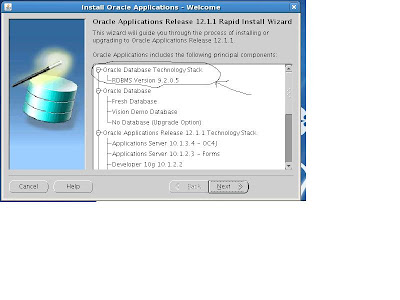
I found this curious as I continued the installation for 12.1.1 EBS as it later on shows the correct database server version (11.1.0.6) that will be installed for the database tier:
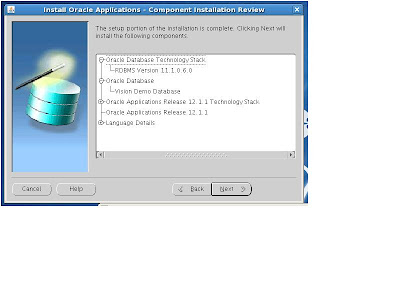
I wonder if Oracle EBS team has caught this bug or not? I will open a bug fix request to product development for the Oracle EBS team.
Cheers,
Ben

I found this curious as I continued the installation for 12.1.1 EBS as it later on shows the correct database server version (11.1.0.6) that will be installed for the database tier:
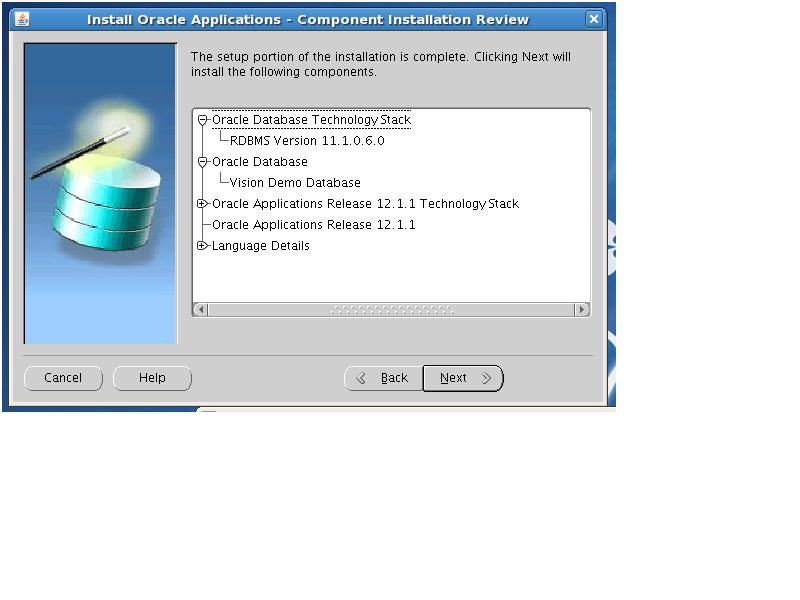
I wonder if Oracle EBS team has caught this bug or not? I will open a bug fix request to product development for the Oracle EBS team.
Cheers,
Ben
Tuesday, June 29, 2010
Part II: Setup Printers for Oracle E-Business Suite Release 12
In this post, we finish our printer configuration for the Oracle Applications R12 E-Business Suite environment. In the previous blog post, we discussed how to use the LINUX tools to configure printers at the operating system level. In this post, we finish the printer configuration by showing you how to setup the printer in the Oracle R12 E-Business Suite environment within the Oracle Applications Manager (OAM) graphical interface.
The first step is to login to the OAM environment as the SYSADMIN user and to navigate to the System Administrator responsibility.
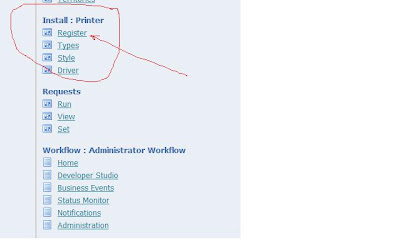
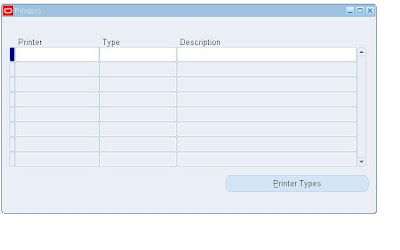
Now we need to setup the printer by register the device.
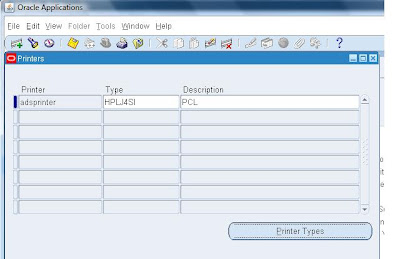
We enter the settings for the printer in the flexfields above.
As such you need to enter the values for the printer driver and print type.


We enter the values for the HP Laserprinter below
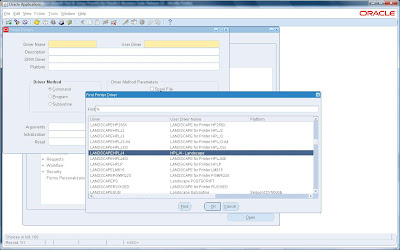
Next we need to configure the HP printer with the correct driver as shown below.
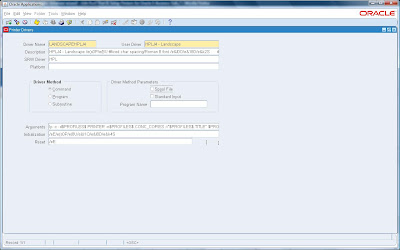
As part of the print driver configuration for the Oracle R12 EBS environment,
we have additional print considerations. For example, the Driver Method comes into play
depending on the command, program or subroutine used with the printer.
We also have Driver Method Parameters that allow us to spool file or generate
print output to standard input as shown below.
OK so now that we have configured our printer, we need to run some post-configuration tests to verify that it works. Fortunately, Oracle EBS provides a suite of utilities and diagnostic tests for us with Release 12.
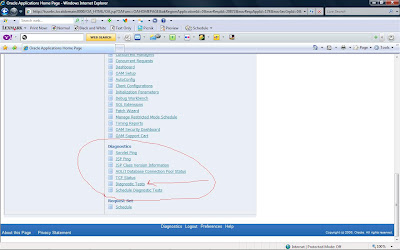
To run these tests, you need to switch to the System Administration responsibility for OAM and navigate to Diagnostics-> Diagnostic Tests as shown below.
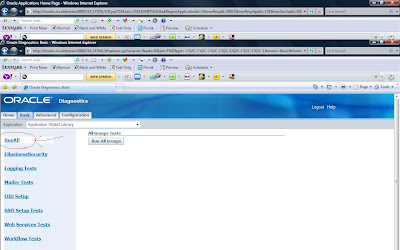
Under the basic tab for the Application Object Library, select RunALL
to generate diagnostics for the environment.
We have covered the basics of printer setup and for future reference, Oracle provides many excellent tips on advanced configuration such as PASTA setup with Oracle R12 EBS.
Below are some excellent references from My Oracle Support (MOS) formerly known as Metalink (http://support.oracle.com)
Pasta Overview Note: 420019.1
Note 356501.1 "How to Setup Pasta Quickly and Effectively".
Note 269129.1 "How to Implement Printing for Oracle Applications: Getting Started" for general driver information.
Note 365111.1 "How to Setup Pasta for PCL Based Printers "
Note 356501.1 "How to Setup Pasta Quickly and Effectively",
Once you run the test for the pasta printer, Oracle Diagnostics will generate an HTML file report to display the configuration details and status report for the printers.
My Oracle Support (MOS) Technical References
NOTE:356501.1 - How to Setup Pasta Quickly and Effectively
NOTE:728077.1 - How to Setup IX Library Quickly and Effectively
NOTE:365111.1 - How to Setup Pasta for PCL Based Printers
NOTE:189708.1 - Oracle Reports 6i Setup Guide for Oracle Applications 11i
NOTE:240864.1 - Activating and Configuring IX Library
Note 60936.1 Step By Step Guide to Set Up a Printer in Oracle Applications
Note 99495.1 Oracle Applications Postscript Printing
Note 112172.1 Oracle Applications Character Printing
Note 152285.1 Building a Printer Initialization String for Oracle Applications
Note 106186.1 How to Test an Initialization String Outside of Oracle Applications
Note 1014599.102 How to Test Printer Initialization Strings in Unix
The first step is to login to the OAM environment as the SYSADMIN user and to navigate to the System Administrator responsibility.

Now we need to setup the printer by register the device.

We enter the settings for the printer in the flexfields above.
As such you need to enter the values for the printer driver and print type.


We enter the values for the HP Laserprinter below

Next we need to configure the HP printer with the correct driver as shown below.

As part of the print driver configuration for the Oracle R12 EBS environment,
we have additional print considerations. For example, the Driver Method comes into play
depending on the command, program or subroutine used with the printer.
We also have Driver Method Parameters that allow us to spool file or generate
print output to standard input as shown below.

OK so now that we have configured our printer, we need to run some post-configuration tests to verify that it works. Fortunately, Oracle EBS provides a suite of utilities and diagnostic tests for us with Release 12.
To run these tests, you need to switch to the System Administration responsibility for OAM and navigate to Diagnostics-> Diagnostic Tests as shown below.

Under the basic tab for the Application Object Library, select RunALL
to generate diagnostics for the environment.

We have covered the basics of printer setup and for future reference, Oracle provides many excellent tips on advanced configuration such as PASTA setup with Oracle R12 EBS.
Below are some excellent references from My Oracle Support (MOS) formerly known as Metalink (http://support.oracle.com)
Pasta Overview Note: 420019.1
Note 356501.1 "How to Setup Pasta Quickly and Effectively".
Note 269129.1 "How to Implement Printing for Oracle Applications: Getting Started" for general driver information.
Note 365111.1 "How to Setup Pasta for PCL Based Printers "
Note 356501.1 "How to Setup Pasta Quickly and Effectively",
Once you run the test for the pasta printer, Oracle Diagnostics will generate an HTML file report to display the configuration details and status report for the printers.
My Oracle Support (MOS) Technical References
NOTE:356501.1 - How to Setup Pasta Quickly and Effectively
NOTE:728077.1 - How to Setup IX Library Quickly and Effectively
NOTE:365111.1 - How to Setup Pasta for PCL Based Printers
NOTE:189708.1 - Oracle Reports 6i Setup Guide for Oracle Applications 11i
NOTE:240864.1 - Activating and Configuring IX Library
Note 60936.1 Step By Step Guide to Set Up a Printer in Oracle Applications
Note 99495.1 Oracle Applications Postscript Printing
Note 112172.1 Oracle Applications Character Printing
Note 152285.1 Building a Printer Initialization String for Oracle Applications
Note 106186.1 How to Test an Initialization String Outside of Oracle Applications
Note 1014599.102 How to Test Printer Initialization Strings in Unix
Printer Configuration for Oracle R12 E-Business Part I: Preparation
In this blog series, we will cover how to setup and configure printers with the Oracle R12 E-Business Suite. As a systems applications DBA, we are tasked with the challenge of printer configuration. Often this is an overlooked item before Go-Live which severely impacts the project success because if the financial analyst or CFO cannot print invoices or financial reports, they will be unable to perform essential tasks even in this Green Day of paperwork reduction.
Part 1: Printer Setup Preparation
Part 2: Configure Printers with R12 E-Business Suite
Ok lets get started. We need to first prepare the operating system to accept our printers for usage before R12 EBS will be able to use the new printer. We will cover how to configure the Linux and UNIX operating system by using the lp facility with CUPS for printing. For reference with HP Printers for Linux, we download the software from
http://hplipopensource.com/hplip-web/install_wizard/index.html
Another good reference site for Linux drivers is the open source site
http://www.openprinting.org/printers/manufacturers/HP
We go to site below
https://launchpad.net/hplip
Download printer drivers for Linux
Our first step is to download the correct printer driver which in our case happens to be an HP Laserjet printer. We download this from the HP site listed below.
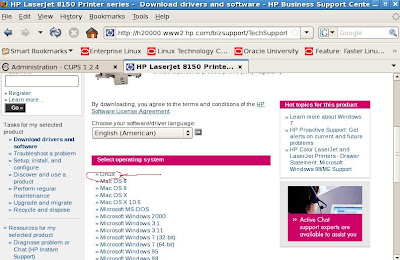
We follow the prompts and download the driver.

Once we have downloaded the print driver, we are ready to install it.
HP uses a download manager for Linux so we choose the Linux version and download it.

Good now we just need to install the software for Linux to configure our HP Laserjet printer. Once we have installed the driver we can run the CUPS utility for Linux to setup our new printer.
Next we need to check the status for the Linux/UNIX based CUPS print server
[root@tusebs etc]# /etc/init.d/cups status
cupsd (pid 5398) is running...
To add the new printer to the LINUX environment, you can use the web gui tool to setup new printer device for LINUX. Open a browser to:
http://localhost:631/admin
The CUPS printer utility will show up as shown below.
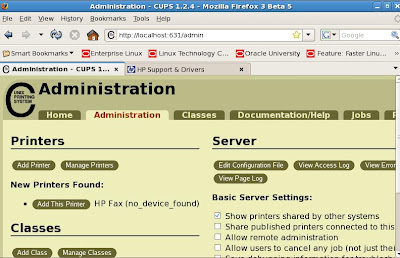
We use this excellent browser based tool to add, remove, adminster and monitor printer configurations for LINUX.
So now we need to add the printer to our environment with the tool.
Click the button in the tool for Add New Printer
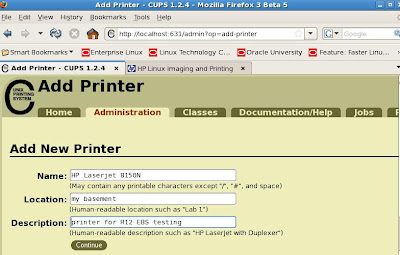
Then click on the continue button.
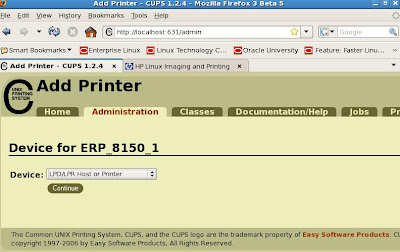
After entering the printer name, you need to enter the device mapping for it.
For example, we used LPD/LPH host or Printer Jet Direct driver but you can also choose from other device mappings such as IP address for the device configuration and
then click continue.
Now we need to enter the device URI for our printer which
in our case, since our HP printer has a Jet Direct card installed so we use this option and enter the socket URI mapping.

Next we click on the continue button. Now you will need to enter the make which is HP in our case and then continue. You can also use a PPD file if you one.
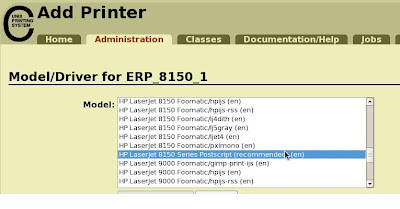
Enter the model/driver for your printer and continue.
Then click on the button to Add the printer.
Once the printer has been added to your LINUX configuration, you can verify status in the printers section of the tool. Make sure to use the concurrent processing server as the focal point for the printer setup and configuration.
Now we are ready to add our printer to R12 EBS environment!
Stay tuned for part II where we use the Oracle Application Manager (OAM) to install and configure our new printer for Oracle R12 EBS.
Part 1: Printer Setup Preparation
Part 2: Configure Printers with R12 E-Business Suite
Ok lets get started. We need to first prepare the operating system to accept our printers for usage before R12 EBS will be able to use the new printer. We will cover how to configure the Linux and UNIX operating system by using the lp facility with CUPS for printing. For reference with HP Printers for Linux, we download the software from
http://hplipopensource.com/hplip-web/install_wizard/index.html
Another good reference site for Linux drivers is the open source site
http://www.openprinting.org/printers/manufacturers/HP
We go to site below
https://launchpad.net/hplip
Download printer drivers for Linux
Our first step is to download the correct printer driver which in our case happens to be an HP Laserjet printer. We download this from the HP site listed below.

We follow the prompts and download the driver.

Once we have downloaded the print driver, we are ready to install it.
HP uses a download manager for Linux so we choose the Linux version and download it.

Good now we just need to install the software for Linux to configure our HP Laserjet printer. Once we have installed the driver we can run the CUPS utility for Linux to setup our new printer.
Next we need to check the status for the Linux/UNIX based CUPS print server
[root@tusebs etc]# /etc/init.d/cups status
cupsd (pid 5398) is running...
To add the new printer to the LINUX environment, you can use the web gui tool to setup new printer device for LINUX. Open a browser to:
http://localhost:631/admin
The CUPS printer utility will show up as shown below.

We use this excellent browser based tool to add, remove, adminster and monitor printer configurations for LINUX.
So now we need to add the printer to our environment with the tool.
Click the button in the tool for Add New Printer

Then click on the continue button.

After entering the printer name, you need to enter the device mapping for it.
For example, we used LPD/LPH host or Printer Jet Direct driver but you can also choose from other device mappings such as IP address for the device configuration and
then click continue.
Now we need to enter the device URI for our printer which
in our case, since our HP printer has a Jet Direct card installed so we use this option and enter the socket URI mapping.

Next we click on the continue button. Now you will need to enter the make which is HP in our case and then continue. You can also use a PPD file if you one.

Enter the model/driver for your printer and continue.
Then click on the button to Add the printer.
Once the printer has been added to your LINUX configuration, you can verify status in the printers section of the tool. Make sure to use the concurrent processing server as the focal point for the printer setup and configuration.
Now we are ready to add our printer to R12 EBS environment!
Stay tuned for part II where we use the Oracle Application Manager (OAM) to install and configure our new printer for Oracle R12 EBS.
Subscribe to:
Posts (Atom)